
SEEDS / ACQUISITION, GROWING & CAPACITY
Steal A Seed Seeds
Get a seed. Grow it. Put it to work.
Choose a seed route, make the right kind of space, then plant, wait, claim and place. Water buckets can help a growing plant finish sooner.
01 / CHOOSE YOUR ACQUISITION ROUTE
What kind of seed are you looking for?
A seed to start planting
The developer says to steal seeds from gardens. ROGameCodes describes starting with a few seeds, without a stated count. If you already have a usable seed, plant it in your own garden.
Your next move: obtain a seed if you have none, then return to planting. Collecting a seed and generating plant income are different steps.
A seed to pursue together
The developer specifically recommends teaming up with other players to steal high-tier seeds. Roblox Game Codes describes escaping plant monsters during rare-seed runs.
Your next move: coordinate with other players for that goal. Use the game community links to find the relevant community.
A source-listed promotional seed
Code publishers report Prime Tree, Thorn and Watermelon seed rewards. These depend on the code being accepted for your account.
Your next move: pick the named reward below, then use its code and the Shop instructions on the code page.
MrGuider describes defending your nursery; these reports give no specific defense controls. The area and guard examples show why a seed run can still fail and when to train before trying again.
LOLGA’s image shows Shop, Backpack, Index and Weapons down the left, Planting Zone and Garden Area signs, and a Stick slot. Use those labels to orient yourself; the image does not explain Stick effects or zone unlock requirements.
02 / FIND THE REWARD YOU MEAN
Three seeds source-listed as code rewards
LOLGA’s September 8 report names these rewards. This is an acquisition reference, not a plant ranking.
Prime Tree
One Prime Tree Seed, listed by LOLGA.
Thorn
One Thorn Seed, listed by LOLGA.
Watermelon
One Watermelon Seed, listed by LOLGA.
RELEASE reward disagreement: RBK Games reports Wastelord Seed for Release, while LOLGA reports Watermelon for RELEASE. RBK also adds 1 Stick to BETA’s Prime Tree reward. These are the publishers’ reports, read September 13; a Stick is a separate item.
Other seed names to recognize
The fan wiki lists Carrot, Blueberry, Beet, Onion, Pineapple, Corn and Watermelon, plus Ice Fluff as a group reward. This partial list does not rank their income. After growing, use placed cash per second to decide what to keep.
The code page owns the full 13-code list, individual source differences, copy controls, redemption steps and failure help. A reward listed there is available to try; redemption has not been tested here.
Frozen-Grenades, Venom-Grenades and Shadow-Grenades are listed as grenades, not three more seed varieties. Their names alone do not explain their effects or establish plant mutations.
03 / CHECK WHICH SPACE YOU NEED
A planter is different from inventory.
Before expanding capacity, identify the thing you want more room for. The developer describes planter unlocks separately from the two inventory offers.
| Your task | Relevant capacity | What to do next |
|---|---|---|
| Grow a seed, but you need another growing slot | Planters | Work toward unlocking more planters through the progression loop. |
| Expand seed inventory | Seeds Inventory Size | Compare the specifically named +100 Seeds Inventory offer. |
| Expand plant inventory | Plants Inventory Size | Compare the separate +100 Plants Inventory offer. |
The two inventory passes are each listed at 79 Robux in the September 10 snapshot, or 158 Robux together. Neither title advertises extra planters. Choose the category you need; buying both is not a prerequisite for planting.
At 09:05 in BemmyBlox’s session, he unlocks a plot and reads 150 million game cash for the next one. His current plot count and the full price ladder are not stated. This is growing-space spending, separate from treadmill upgrades.
Compare both inventory passes and the other offers →04 / FROM A SEED TO AN EARNING PLANT
Grow it, claim it, then place it.
A grown seed still needs to be claimed and placed. The steps combine LOLGA’s September 11 guide with BemmyBlox’s captions. The timers and income readings are session examples from his session.
Read the Speed recommendation beside the guard. Approach a seed and press E on PC, then carry it outside that guardian’s garden zone. LOLGA says the steal only counts once you leave; getting caught inside knocks the seed away. Retry the pickup or choose an easier target if you keep losing it.
- 1
Find an available planting position.
Bring the seed to your garden’s Planting Area. At 01:50, he cannot put a seed down until he finds the right position. Growing spots are separate from seed and plant inventory.
On PC, keep the seed selected and move to an available planting target until its E Place prompt appears, then use E there. LOLGA’s September 11 planting screenshot, read September 15, shows a held Rose Seed, a green target square on the brown floor and the Planting Area sign. If no Place prompt appears, recheck the held seed, planting position and available space.
- 2
Plant it and read its timer.
After planting, look for the countdown above that seed. LOLGA describes the plant appearing when it reaches zero; then claim it and place it to earn. His early common takes 25 seconds (00:22), while a blue rare takes 3 minutes (01:53). These are session examples, not fixed timers for every common or rare.
- 3
Wait, or use an available water bucket.
Buy an in-stock water bucket from the item offers and use it on the intended growing plant. He finds items that reduce plant time at 02:15–02:33, after initially thinking time could not be skipped. He later uses buckets repeatedly, sometimes twice or more, and explicitly names the water bucket at 12:11.
Check the current stock. The session does not supply each bucket’s price, reduction amount or refill schedule.
- 4
Confirm which plant you are accelerating.
At 04:13, he realizes he used the item on the wrong plant. The 33 Mini Corn reading belongs to that wrong target, not to his intended group reward. Check the target before using another bucket.
- 5
Claim the grown plant, then place or swap it.
At 04:27–04:35, he claims a plant, reads 176 base value, swaps it into a producing position, then reads 922 per second. Claiming and placing are separate steps. Compare the placed result before replacing an earner.
After claiming, select the grown plant and go to the Garden Area’s wooden slots; use the E Place prompt at your chosen available slot on PC. LOLGA’s September 11 grown-plant placement screenshot, read September 15, shows a selected Pumpkin there. This is mature-plant placement; it does not show the claim input or the seed-growing position.
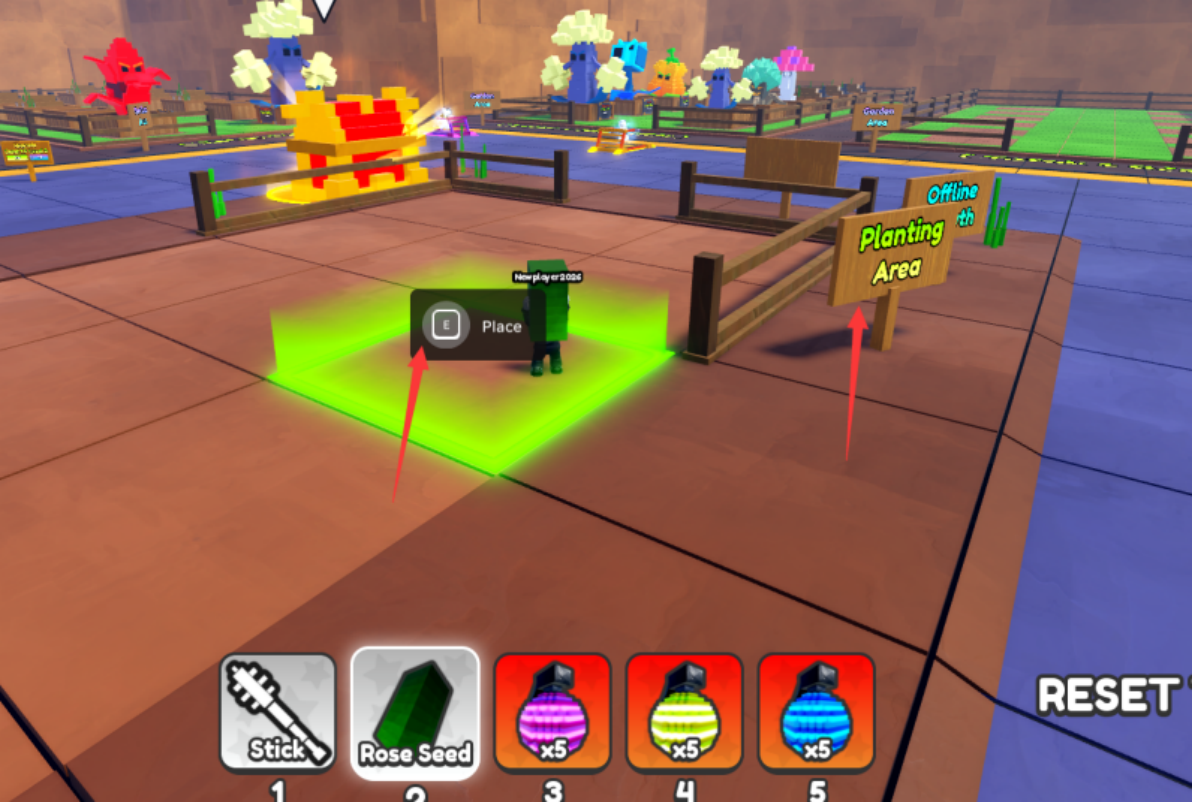
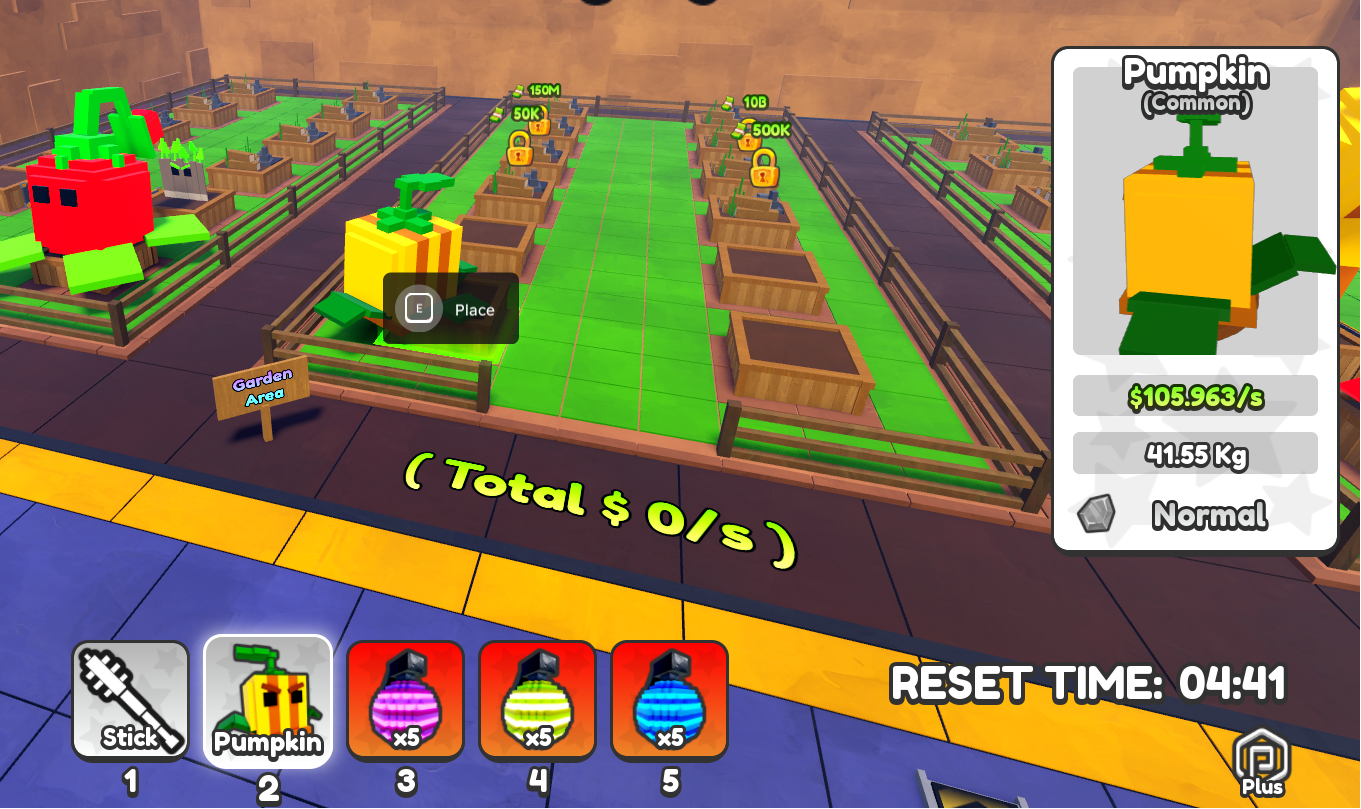
Replacing an occupied position? LOLGA reports that the previous plant moves into storage. Compare its placed income before the swap, then compare the replacement under the same boosts. This storage result is separate from selling a plant.
LOLGA supplies the PC pickup key E. The two images also show PC E Place for seed planting and mature-plant placement. They do not establish a claim key, water-bucket-use key, hold duration, or touch/controller bindings. Follow the currently displayed binding if it differs; a missing Place prompt alone does not by itself identify a bug or require a purchase.
At 00:49, his then-current plant automatically collects money; check each placed plant’s counter to see its behavior. ROGameCodes and GameWala separately describe selling grown plants for money, without giving sale controls or sale prices. The developer describes plants earning cash, and MrGuider reports passive income; the documented cash loop also includes placed-plant income.
05 / OTHER WAYS TO RECEIVE A SEED
Group rewards, gifts & Random all seeds
Random all seeds gives a random seed in this session.
At 10:06, BemmyBlox uses it, receives one random seed, dislikes the result and corrects his earlier assumption that it reset all seeds. His 04:41 mention of 7 Robux was a question during that mistaken interpretation, not a verified reset fee. At the end, he again dislikes the random results.
It is not a promised rare seed or a growth-timer reset method. Water buckets are the demonstrated growth aid.
The group reward has its own growing timer.
At 03:43, he joins the group and says he receives a seed transcribed as ice fluff, with an 11-minute timer in that session. The correct creator group is Rainbow Isle Tycoon. The transcript does not give the complete join, return and claim-menu sequence.
The fan wiki also identifies Ice Fluff as a group-join reward; it does not supply the complete claim-menu sequence or its income.
Automatic captions use ice fluff here and Cactus dad later; they do not establish a single official species name. The wrong-target Mini Corn’s 33 reading above is not the group reward’s value.
Gifts show cooperation, not a confirmed trade window.
From 05:15, another player supplies seeds and later repeatedly drops them off. BemmyBlox plants and claims them. That supports gifting and cooperation, but does not supply a trade window, exchange values, payment steps or a confirmation procedure.
His rapid later growth combines that help with paid boosts, trails and buckets. It is not a promised solo or free-to-play timeline. Use the plant-income comparisons to choose what to keep after claiming.
06 / CHOOSE YOUR NEXT RESULT
Plant for income.
Train for Speed.
Treadmill training advances Speed; more planting space solves a different bottleneck. The progression checklist helps when more than one part feels stuck. The area and training guide adds recorded Speed suggestions, upgrade spending and carry failures.
The developer describes rare varieties, sizes and mutations. Those labels alone do not rank Prime Tree, Thorn and Watermelon as earners. Use the individual plant examples and their conditions for comparisons.
Return to Steal A Seed ↗Steal A Seed seed index: named growing inputs
Giantwood Seed is the selected blue seed visible in the footage. Prime Tree, Thorn, Vine and Wastelord are publisher-listed code rewards; the shorter name and the name ending in Seed refer to the same entry here.
| Seed | Acquisition reference | Code |
|---|---|---|
| Giantwood Seed | Selected blue inventory seed in the gameplay sample; see the acquisition route below. | No code shown in this observation |
| Vine Seed | Code FREEZING | FREEZING |
| Thorn Seed | Code BUG005 | BUG005 |
| Prime Tree Seed | Code BETA | BETA |
| Wastelord Seed | Code Release | Release |
The existing Carrot, Blueberry, Beet, Onion, Pineapple, Corn, Watermelon and Ice Fluff references remain above. This is a partial index. Reward names do not establish spawn chances or the rarest seed. Compare the eventual placed plant income and choose a return with the area Speed references.
How Giantwood Seed was obtained in the gameplay sample
BemmyBlox returns toward the second section's carrot guard and is then holding a blue seed; the paused inventory at 1:48 identifies it as Giantwood Seed. This links the narrated pickup route with the visible seed name.
- Head toward the second section and its carrot guard, following the run shown at 1:39–1:53. The displayed area recommendation is 900 Speed; the creator has about 300 here. Treat the recommendation as guidance, not a proven hard unlock.
- Take the seed and complete the return using the pickup/carry procedure above. This particular run ends with the selected blue Giantwood Seed. The footage does not establish a fixed spawn point or a guaranteed seed on every visit.
- Plant it in an available garden slot. At 1:50–2:00, the creator describes a blue rare plant with a three-minute growing timer.
- Wait or use an available water bucket, then claim and place the grown plant. Read its placed income before deciding what to replace.
This is a sourced acquisition example, not a Giantwood drop-rate table or a promise that every second-section seed gives the same result. Seed identity, the growing plant and its placed income are separate observations.